
Predict Rate Limits Before They Hit
Rate limits don't have to be a surprise. My Claude monitors your usage against all rate limit windows and tells you exactly when you'll hit them - not a percentage, a timestamp. Set alerts at any threshold and get notified on desktop, WhatsApp, or Telegram.
Threshold Alerts
Set percentage thresholds for each rate limit window. When your usage crosses a threshold, My Claude sends a notification through your chosen channels.
Configure alerts at any percentage you want:
- 50% - Halfway through, time to be aware
- 75% - Getting close, consider pacing
- 90% - Almost there, slow down or take a break
- 95% - About to hit the wall
- Custom - Enter any percentage from 1-100
Each threshold can trigger notifications on desktop, WhatsApp, Telegram, or any combination.
Pace Alerts
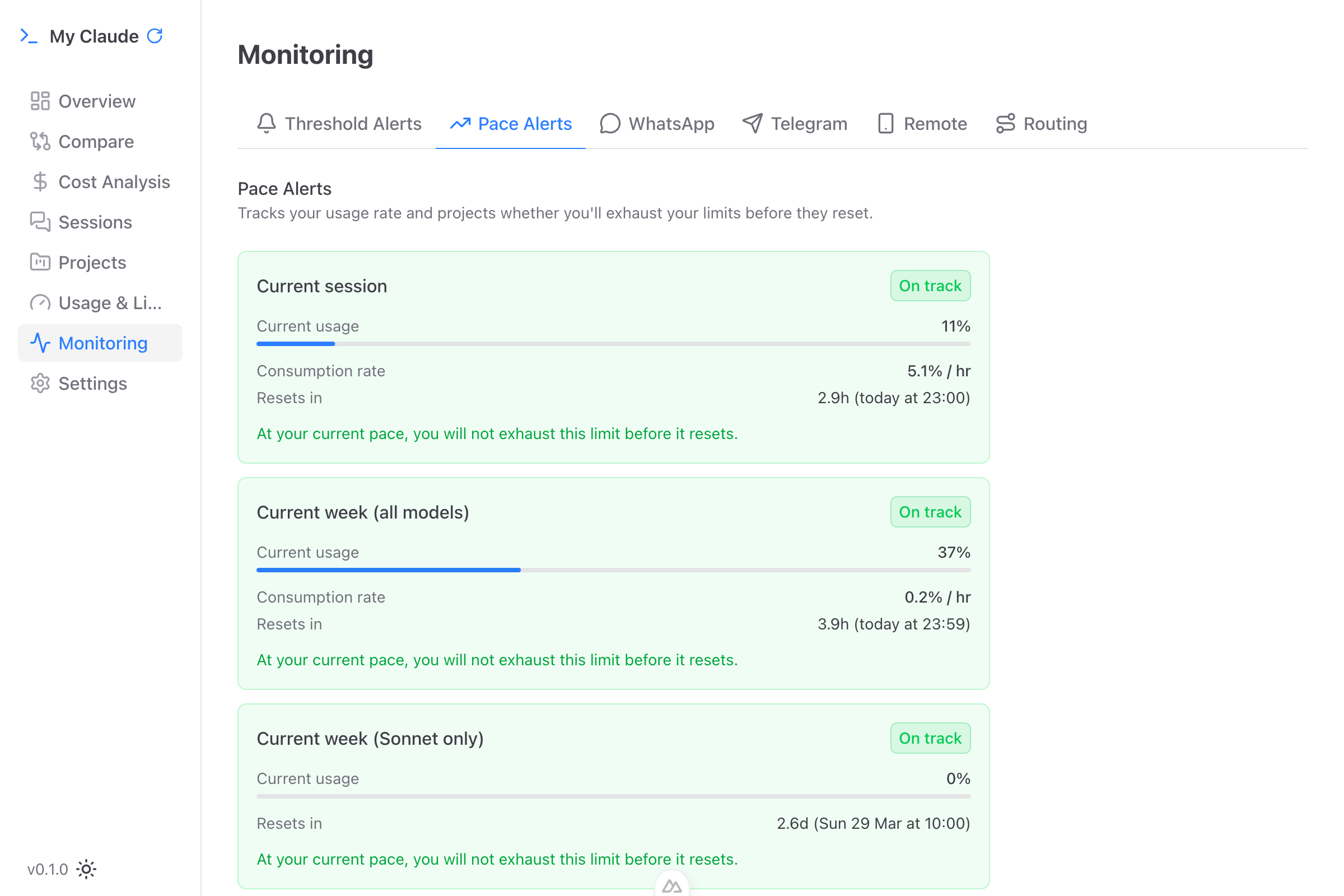
Pace predictions are the standout feature. Instead of just showing your current utilization, My Claude projects your usage forward and assigns a status:
- On Track (green) - Your current burn rate is sustainable. You'll reset before exhaustion.
- Warning (yellow) - At this pace, you may hit the limit. Shows projected exhaustion time.
- Critical (red) - You will hit the limit before the window resets. Shows the exact time: "WILL EXHAUST IN: tomorrow at 8:45am"
Each pace card shows:
- Current utilization percentage with progress bar
- Burn rate (e.g., "73% / hr")
- Time until window resets (e.g., "5h 23m - today at 11:43pm")
- Plain-English verdict ("On track to reset safely" or "Warning: Will exhaust in 7h 12m")
When your pace status changes, you receive an alert through your configured channels.
Three Rate Limit Windows
My Claude tracks all three of Claude Code's rate limit windows separately:
- 5-Hour Window - The primary limit. A rolling window that resets as time passes. This is what causes rate limiting during active usage.
- 7-Day Window - The weekly allocation. Prevents sustained heavy usage over longer periods. Easy to burn through early in the week without realizing it.
- 7-Day Sonnet Window - A separate limit specifically for Claude Sonnet usage, tracked independently from the main 7-day window.
Each window has its own threshold alerts, pace predictions, and notification settings.
Quiet Hours
Configure a quiet window (e.g., 10 PM to 8 AM) during which notifications are suppressed. Alerts that trigger during quiet hours are still recorded in the notification history but won't buzz your phone or desktop at 2 AM.
Notification Cooldown
To prevent alert spam, My Claude includes a configurable cooldown period:
- 15 minutes - Frequent updates
- 30 minutes - Moderate
- 1 hour (default) - Balanced
- 2 hours - Minimal interruption
After a threshold notification fires, the same threshold won't trigger again until the cooldown expires. If your usage drops below the threshold and crosses it again, a new notification is sent.
Configuring Alerts
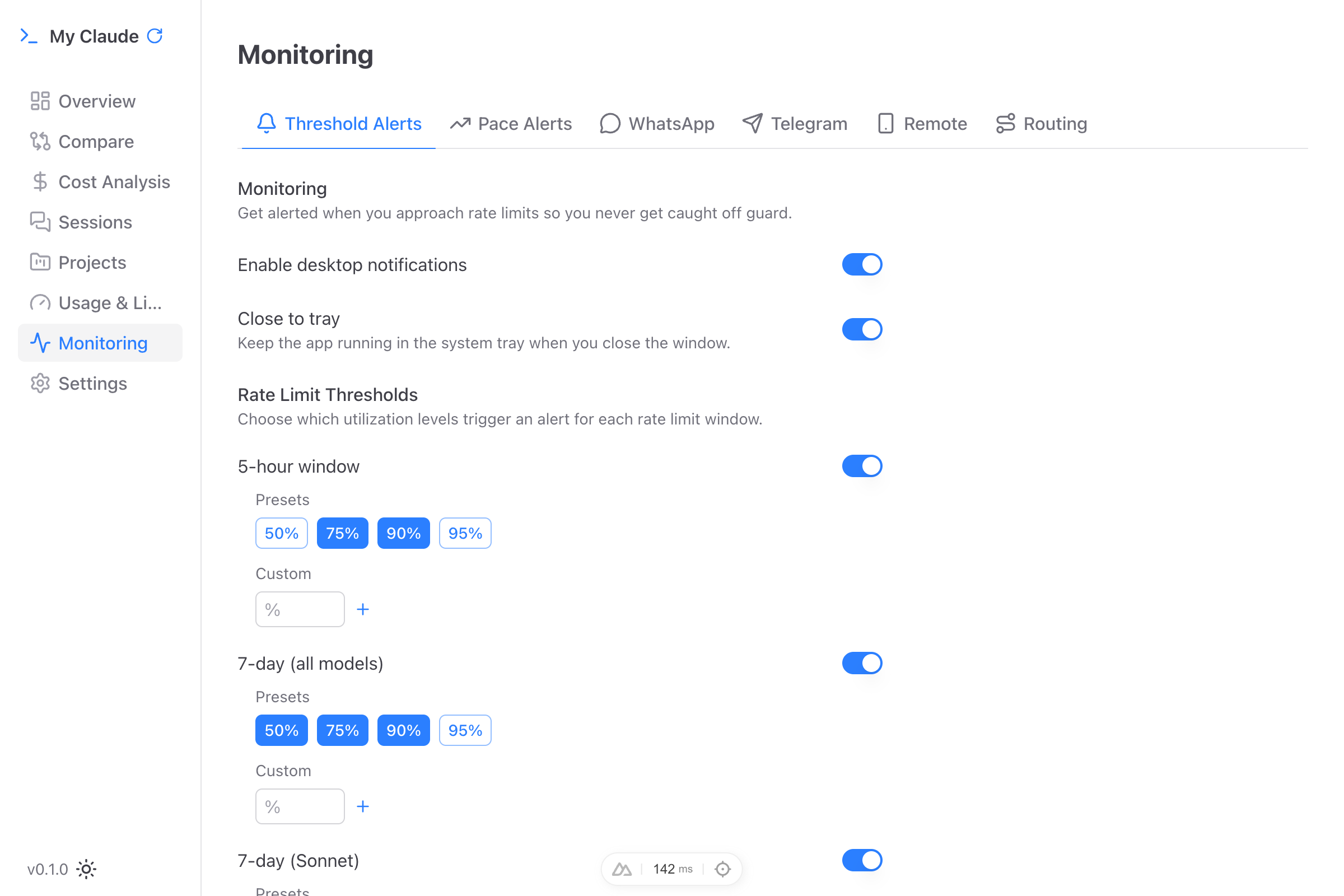
- Navigate to Monitoring in the sidebar
- Select the Threshold Alerts or Pace Alerts tab
- Set your desired thresholds and notification channels
- Configure quiet hours and cooldown periods
- Alerts activate immediately after saving
Notification Channels
Threshold and pace alerts can be delivered through:
- Desktop Notifications - Native OS notifications (macOS, Windows, Linux)
- WhatsApp - Messages sent to your phone or a WhatsApp group
- Telegram - Messages sent to your Telegram account or a Telegram group
See Notifications for setup instructions for each channel.