
Remote Control via WhatsApp & Telegram
Remote Mode turns your WhatsApp or Telegram into a control panel for Claude Code. Approve permissions from your phone, send follow-up instructions from a meeting, switch between running sessions, or kill everything with a single message. Claude keeps working while you're away from your desk.
How It Works
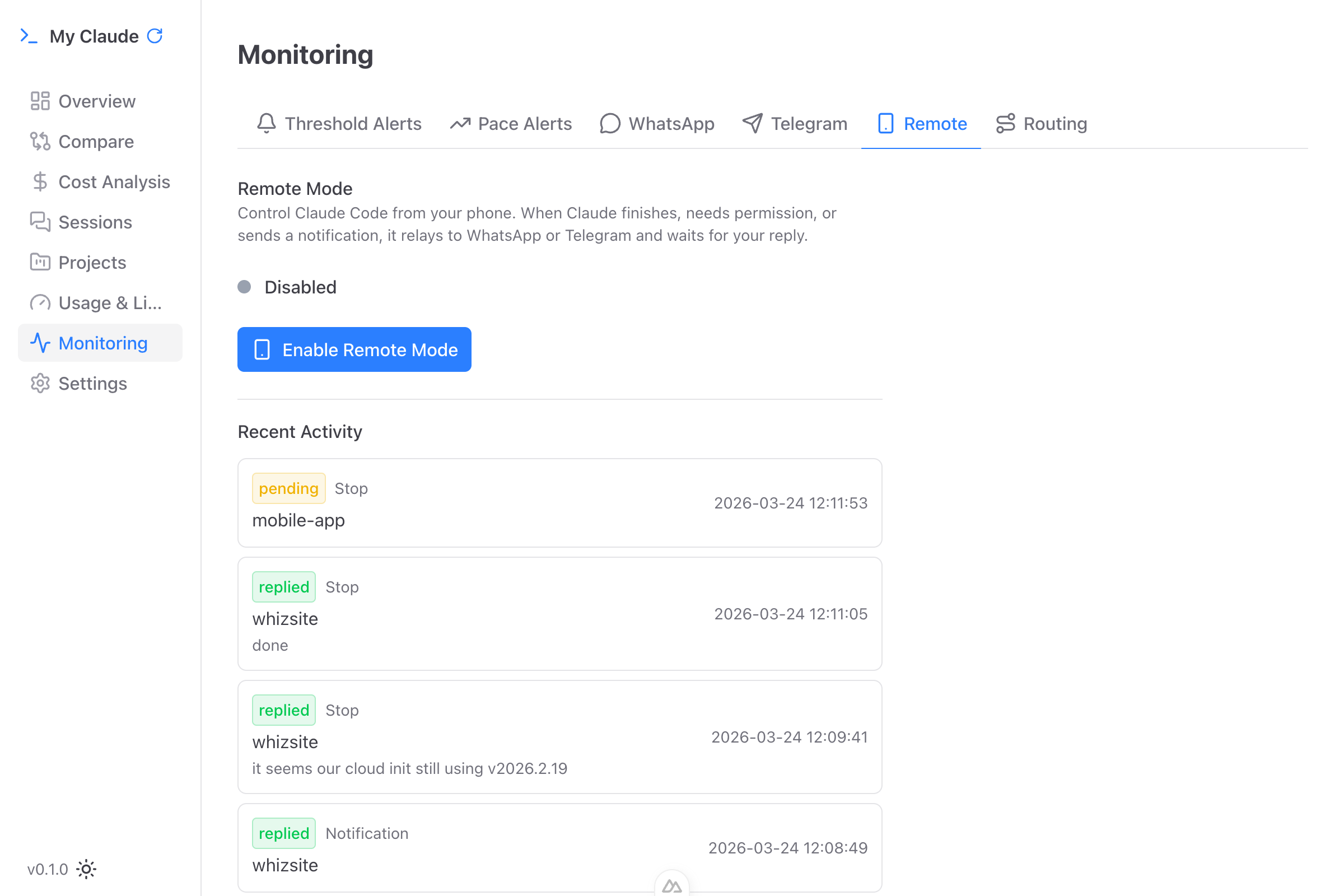
When Remote Mode is enabled, My Claude acts as a bridge between your messaging app and Claude Code running on your computer. Three types of events trigger messages to your phone:
When Claude Finishes a Task
You receive the last response on WhatsApp/Telegram. You can:
- Reply with a new instruction - Claude picks it up and continues working
- Reply "done" (or "stop", "finish", "ok") - Claude stops gracefully
- Do nothing - Auto-timeout after the configured period (default 60 minutes)
When Claude Needs Permission
You receive the tool name and details. You can:
- Reply "allow" (or "yes", "approve", "ok") - Tool execution proceeds
- Reply "deny" (or "no", "reject") - Tool execution blocked
- Do nothing - Auto-denied after timeout (safety-first design)
Status Notifications
Fire-and-forget updates about Claude's status. No response needed - just stay informed.
Setting Up Remote Mode
Prerequisites
- WhatsApp or Telegram must be connected first (see Notifications)
- Claude Code must be installed on your machine
- My Claude must be running on your computer
Enabling Remote Mode
- Navigate to Monitoring > Remote in the sidebar
- Toggle Remote Mode on
- Select which hooks to enable (task completion, permission requests, notifications)
- Choose which messaging channels to use (WhatsApp, Telegram, or both)
A green pulsing dot confirms Remote Mode is active.
Session Selection from Your Phone
When multiple Claude sessions are running, you can pick which one to interact with:
- Send any message containing "claude" to your personal chat
- My Claude lists all active sessions: "Active Claude Sessions: 1. myproject 2. anotherproject"
- Reply with the number to connect to that session
- If only one session is running, it auto-selects
Sessions auto-disconnect after 15 minutes of inactivity to prevent stale connections.
The Kill Command
Type "kill" in your messaging app to immediately cancel all pending requests and stop running operations. This is your emergency brake - useful when Claude is doing something unexpected and you need it to stop now.
Per-Project Routing
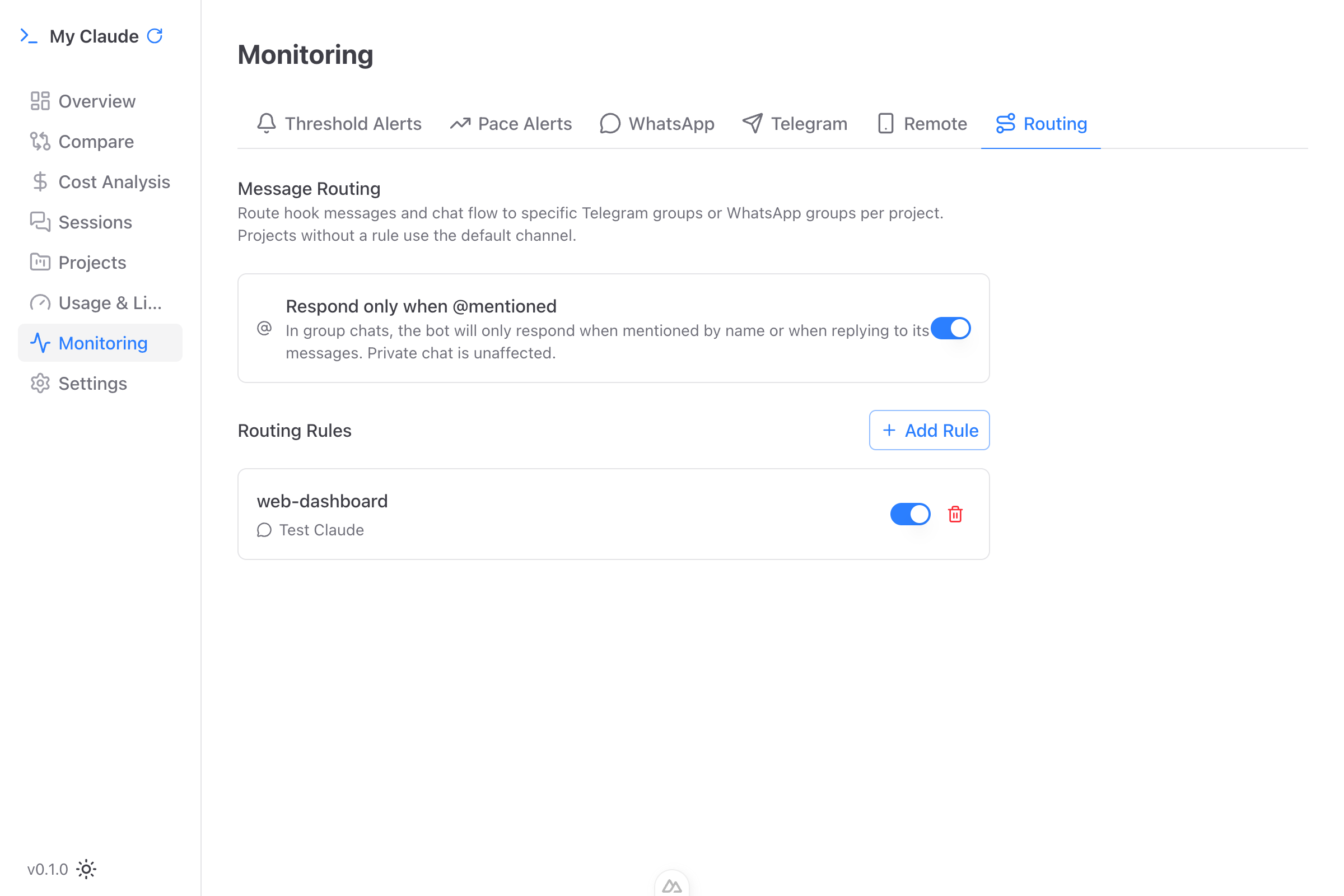
Route different projects to different WhatsApp groups or Telegram chats. Your team can see and respond to only the projects they care about.
Setting Up Routing Rules
- Navigate to Monitoring > Routing
- Click Add Rule
- Select a project and choose the destination group/chat
- Groups are discovered automatically from your connected accounts
Each rule can be toggled on/off without deleting it. If no routing rule matches, messages go to your default personal chat.
Telegram Mention-Only Mode
For busy Telegram groups, enable mention-only mode so the bot only responds when @mentioned. This prevents the bot from reacting to every message in the group.
Timeout Configuration
Configure how long My Claude waits for your reply before auto-handling the request:
- 15 minutes - Quick timeout for fast-paced work
- 30 minutes
- 60 minutes (default) - Balanced
- 120 minutes - Long timeout for when you're away
Permission requests auto-deny on timeout (safety-first). Task completion notifications auto-stop Claude on timeout.
Pending Requests
The Remote Mode panel shows any currently pending requests:
- Hook event type
- Time elapsed since the request was sent
- Cancel button to dismiss without replying
A history of the last 20 remote interactions is available with timestamps and outcomes.
Security
All communication between My Claude and your messaging apps happens through your local machine. Messages are relayed locally - My Claude acts as a bridge on your computer, not a cloud service. Prompts and responses are not stored on external servers beyond what WhatsApp or Telegram themselves retain.